A Text-Typed Date Column Doesn't Announce Itself as Broken
Power BI, Power Query
A date column stored as text is one of those problems that never throws an error. It just quietly removes features and sorts things wrong, and if you're not looking for it specifically, you can ship it.
I hit this on a model where OrderDate came in from the source as Text. Could have been a CSV import, a source system storing dates as strings, or a type change someone made upstream months ago. By the time it reached me it was just text that looked like dates.
It looks completely normal in a table
The column was there. The values displayed correctly. Nothing about a table view told me anything was wrong. The problem only showed up once the column hit a visual.
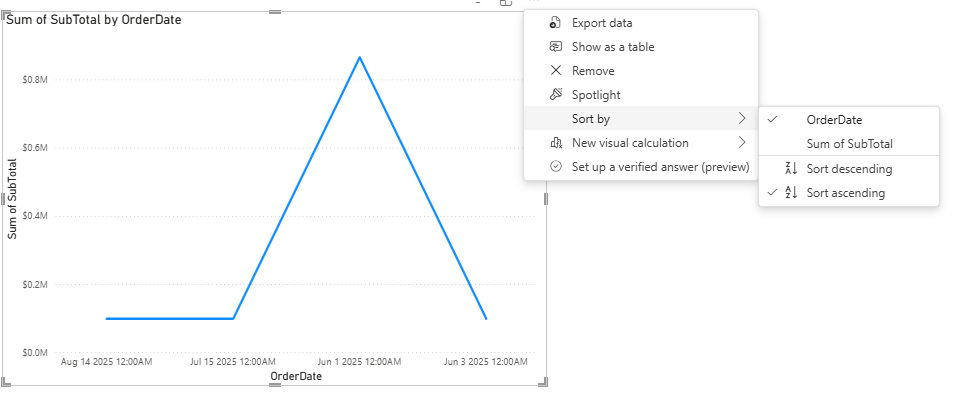
The chart sorted backwards
A line chart of Sum of SubTotal by OrderDate sorted Aug 2025 → Jul 2025 → Jun 2025 → Jun 2025. Power BI was ordering the values alphabetically as strings, because that's what they were.
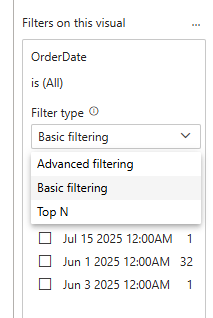
Then I opened the filter pane. The Filter type dropdown offered Advanced, Basic, and Top N — and that was it. No Relative date. Any time intelligence that depends on a real Date type simply wasn't on the menu.
The fix is a type change, not a formula
In Power Query: right-click the OrderDateheader → Change Type → Date. Close & Apply. No transformation, no custom column — the data was already dates, it was just wearing the wrong type.
After the fix
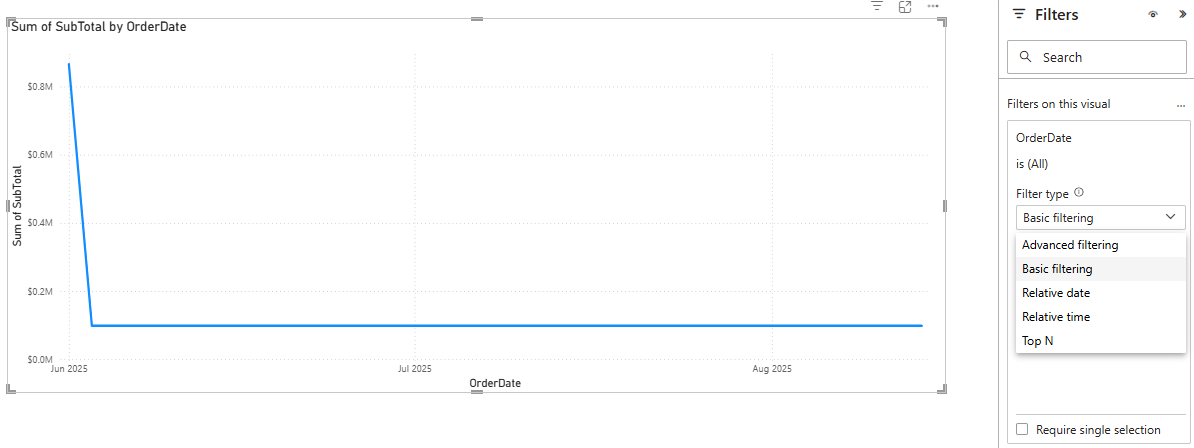
Same chart, same data: Jun → Jul → Aug, chronological. And the filter pane now offered Relative date and Relative time — features that were invisible a minute earlier on the exact same column, typed wrong.
A text-typed date field passes every check that looks at values and fails every one that depends on type. Check column types the moment you connect a source, not when something visibly breaks.
What I take from this
- No error, no warning — a wrong type only shows up as wrong behaviour downstream
- Text dates silently disable correct sorting, relative-date filters, and time intelligence
- The fix is a five-second type change in Power Query; finding it is the slow part